
The iPhone stocks application is a simple app that displays the current stock price of a list of stocks that you provide.
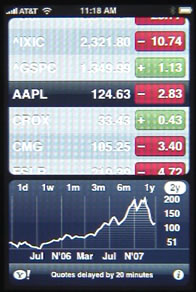
The main screen shows the stock symbol, the current price, and the relative change for the day. Red is used to indicate a falling price, green to show a rising price. The chart at the bottom of the screen shows graph of the stock price for the selected stock.
Pressing the i button at the bottom right of the screen will bring up the list of stocks you are tracking so you can edit them. You can click on the button to the left of the stock to delete it from your list. You can also click on the % or Numbers buttons on the bottom to choose to display a percentage of change, rather than actual dollars per share value.
You can re-arrange the stocks by pressing and dragging the right end of the stock line up or down.
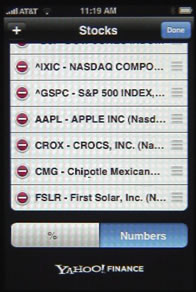
To add a stock, press on the + button at the top of the screen. You can then type the symbol of the stock or the stock name and it will look up the stock symbol for you.
iPhone Stocks Application
To add the Dow Jones Industrial Average, use ^DJI. The Nasdaq is ^IXIC. The Standard and Poors Index is ^GSPC.
Comments: 99 Comments
Comments are closed for this post.


Is it possible to change the way the name of the stock is displayed i.e. from IXIC to NASDAQ?
Not that I know of.
I would like to add non us stocks e.g. stocks listed on londin stock exchange, but no joy. Any ideas on how this can be done?
peter: I just tried adding one and it worked: "RDSA.L" This is a Yahoo application, so anything you enter into Yahoo Finance should work.
Not all stocks will be listed by Yahoo for example Goldcorp on NYSE (GG) will but not Goldcorp on TSX (G)in fact Yahoo doesn't even know it exists it offers multiple chinese variants. I just drop the app and go with a private listing provider they are free as well.
Is it possible to add mutual funds such as AGF china focus class from canada. I know the code (agu*chi) but the application can't find anything.
drmarkz: The stocks app pulls its data from Yahoo. So if you figure out how to refer to the stock in Yahoo, then it should work in the stocks app. However, there are also many good third-party apps that show stocks too.
Is there any way to remove the graph? I just want the list with the numbers.
aeiseman: No, there really aren't any options. It is a simple app. If you want something more custom, you may want to find a Web site that shows stocks like you want, and then create an icon bookmark for that Web site.
Thank you!
Is there a way to remove this ap? I do not need it
John: No, you can't remove the built-in apps, at least not yet. But you can move it to the last screen to get it out of your way.
The default stock app is for amateurs ....
Have you guys checked out PortfolioLive? I use it each and every day to track 3 of my portfolios (45 stocks in total). It is super easy to use, has advanced Portfolio management features (like shorts, multiple lots, cash). The devs are also releasing updates very frequently …
Oh and it has an awesome real-time stock engine … you can barely see the little communication icon go off. No charts but there is no easier way to check your stocks while at line at the deli.
It's just a guess, but do you work for PortfolioLive. It looks really bad when the makers of software spam boards about their own products.
I'd like to get spot gold and silver prices from this application, not a separate webpage. One poster suggested using "xauusd" for gold but that does not work. I've searched yahoo since I understand the iphone app uses yahoo's stock engine but haven't found any symbols that give spot gold and silver prices.
Any suggestions?
It is just a matter of finding the Yahoo stock code for those things. Whatever works in Yahoo finance should work in the app. I don't know what they would be, though.
Looks like gold may be ^YHOh714 and silver may be ^YHOh715
I found them by searching for "gold prices yahoo" and then getting to a Yahoo "Industry Center" page, and then clicking on the "Gold" link to go to a regular finance page which used the code. Same for Silver.
You need to put it exactly as "XAUUSD=X"...ie all the characters between the quotes. I think you just missed out on the =X part. This works for me. I also use XAGUSD=X for silver.
try --> xauusd=x
as a matter of fact, for all currency pairs, you should add =x to the end
such as:
eurusd=x
works just fine!
how can I add the TXS Composite to the list of exchanges?
Search through Yahoo finance until you find the code for it.
If you mean TSX I use ^GSPTS, however as I noted earlier not all exchange listed stocks register for Yahoo, for example Goldcorp on TSX G.TO does not register.
Found it! Thanks
I touched the stock graph at the bottom of the stock quotes and the graph disappeared and was replaced with news items. How do I get the graph back?
If you touch the bar at the very bottom of the screen, where there re three dots, it will rotate between the graph, news, and stats. Just keep touching the three dots to rotate through them.
If you need just simple stock portfolio tracker that does not require any accounts and registrations, this one is ideal:
http://itunes.apple.com/WebObjects/MZStore.woa/wa/viewSoftware?id=325375164&mt=8
is there any application to look the charts such as stochostics or MACD for any stocks?
I'm sure there are many. Check out http://macmost.com/iphoneapps/?search=stocks to see any fit your needs.
I'm missing the current price and the relative change in my version and I have no recollection of ever seeing them and can't find any option to alter it.
Is there a way for me to get them back?
Try clicking on the "i" button at the bottom of the screen and then playing with the settings at the bottom of the next screen. You could always get a better 3rd-party stocks app from the App Store too.
Can you get this app on the ipad?
No. But you can get many many better apps than this that show stock market info.
Wat app do you recommend if the iphone Stocks app isn't available on the ipad? I would like something as similar aspossible.
Try searching. There are lots. I'm not into tracking stocks, so I don't have a recommendation. I think the Bloomberg one had this functionality. Maybe start there.
The App displays totally random graphs for BP shares when selecting 1week or 1 day graph options.
If it can't display simple operations such as this, how can one trust this app for displaying any data reliably.
This is an Apple standard phone app and shoul operate as part of the phone .
Is there anyway of changing the base currency rate from US dollars to NZ dollars? I have various currancies on there, but would like to see what these are doing against the NZ$, not the US$. Cheers
If you need that kind of functionality, then I would suggest getting a third-party stocks app. There are tons of them, with much more capability.
Hi Johnny. Use this format to change base currency to New Zealand Dollar:
USDNZD=X (for US Dollar)
EURNZD=X (for Euro)
GBPNZD=X (for British Pound)
etc
I just got a new iPhone and want to transfer my old iPhone stock list on it. Any idea where the list of watched stocks is stored or backed up so it can be put on a new device?
I'm pretty sure there is no way to do it. That's an old pre-app store app that doesn't have much functionality. If you have that many stocks, you may want to look into a better stock-tracking app. There are so many.
Charts for a particular stock are wrong 99% of the time. This has been going on for several months at least. Sometimes it shows wrong date, sometimes wrong price, etc... Any thought on where I can report this bug.
Stock in question is CGY.DE thought I assume the issue is more widespread than this single issue.
http://www.apple.com/feedback/iphone.html
thanks
Hi guys, my stocks app isn't refreshing the correct price. Sometimes the price changes, but the graph doesn't work? I give up. Any ideas??? Please help. I use this app all the time, it's just easy and convenient when it works! :)
The built-in stocks app of my iPhone4 from Yahoo stopped working on 19 January, the sign keeps spinning and saying "getting data..." every time I open the app. Tried close and open but nothing changed. It used to work very well and I like it. All the other funcions of the iPone are working. How can I get the app back to normal? Please HELP
My iphone stock ap will only give me foreign quotes and pink sheet quotes all of a sudden. Trying to follow AKS (A K Steel) and it only gives me the Mexico symbol. What is up with this???
tried adding BA for Boeing & seemed to get everything but Boeing. any ideas?
this app can't find KV Pharmaceutical, no matter how I arrange the symbol. Am using the correct NYSE ticker symbol.
The Stocks App on iPhone 4 cannot find the symbol for Royal Dutch Shell PLC - Class A (RDS-A). It's listed on the Yahoo Finance website, but I can't get it on my phone. Any ideas? Thanks in advance.
I liked his app on my iPhone à lot, Now i hane an iPad and cannot this exact Same app for iPad
It is built into the iPhone, but isn't a part of the iPad at all. I would just get one of the much better stock apps out there. There are tons of them.
See episode 480: http://macmost.com/iphone-stocks-apps.html
I know it sounds odd but my standard 'stock app icon' has disappeared from my screen, and I've checked all pages. Know how I can get it back?
Make sure it isn't inside of an app folder. If not, then a restore is the only way to get it back. Or, perhaps try a better third-party stocks app. There are many.
I had the same thing happen and unsure how to determine if it is in another app folder
Try this: Settings, General, Reset, Reset Home Screen Layout.
Thank you so much. Accidentally "lost" this app from my iphone and have just found it again thanks to you!!
This article doesn't appear to mention that if you tip your I-device on its side, you get the graph in higher detail. I have a question, what is the funny tiny bar chart under the main graph for?
I believe that is trade volume.
What is the maximum number of stocks I can add to this application?
Not sure. You can experiment and see. But if you are looking to add a lot, you probably want to go with a more powerful app. See episode 480: http://macmost.com/iphone-stocks-apps.html
Can this app transfer to ipad2 and if how? I love it.
No. It is pre-installed on the iPhone only (iPod touch too?).
Anyway, while it is a useful app, there are many free ones that are much much better. See episode 480: http://macmost.com/iphone-stocks-apps.html
I have one stock which is showing the wrong ticker and the graph/highs & lows is wrong. Melrose plc (MRO) Any comments? Remainder of my portfolio is OK
so for some reason, my stock app will no longer show the news...everytime I refresh it just saids, "There isn't any news." Does anybody know how I can get the news back on the stock app??? Thanks!
I have the same problem, news that shows on yahoo finance for our stock doesn't show on the iphone for other stocks it does. Anyone know how news gets published here and through which distribution?
I want to show the Nickel-Price from London-Metal-Exchange in the Stocks-App on iPhone, but it seems not to work. I only find a way for Gold and Silver (xauusd=x and xagusd=x). Is there any way to show the Nickel-Price?
Thanks in advance
Perhaps it isn't possible with this simple app. But I'm sure many third-party apps do this.
I think so. But i have ios5 gm installed and there are a ticker for the stocks-app in the new notification-center. I hope there will be a third-party app very soon which can do this also.
I installed ios5 and was looking to customize the notification widget for stocks. Is there a way to import a list of a few dozen stocks from my Y! finance portfolio short of typing each through the iphone's Stocks app? ps. yeah, i guess i could have typed that instead of typing here :)
No, no import options. Type them in, or consider a better Stocks app and type them in there. (Episode 480: http://macmost.com/iphone-stocks-apps.html)
For two days my iPhone stock quotes have been wrong. One stock right now is more than 2% wrong compared to online aps. What is going on?
Where can I find this App? It came with my iPod, but does not appear on my iPad. Is it possible to download this App for free? Or in my case, could I transfer or copy it from my iPod onto my iPad?.."......Thanks for your help
It isn't an iPad app. It comes on iPhones by default, but cannot be downloaded on its own. Just choose one of the dozens of third-party (and much better) stocks apps. See episode 480 for some ideas: http://macmost.com/iphone-stocks-apps.html
For the past 3 days I only get two Korean quotes and everything else is gone. Is there any way to restore what I had before? I tried: Settings, General, Reset, Reset Home Screen Layout - but nothing changed.
can I get this app on my iPad?
No. But you can get many many other stocks apps, most much better. See http://macmost.com/iphone-stocks-apps.html
Mystery!
When I add or remove a ticker symbol, my wife's phone is also updated.
I am not logged into yahoo finance and both of us have a different apple id.
How does this happen?
That's odd. I didn't think the Stocks app even had some sort of networked functionality. No idea why it would behave like that.
I am unablle to add stocks by the way its shown above.
what exactly i have to do to add stocks?
I press and hold and roll up and down but it doesnt work.
Plz help..
To add a stick hit the "i" button at the bottom. Then the + button at the top of the next page.
The built in stock app for the 3GS isn't a trading app is it?
No. Not at all. It just displays data.
Why is my stocks app shows green for negative and red for positive?
My iphone wasn't working right, so I got a new one under warranty. Now, the stock page just shows a - beside the stocks instead of a number and it shows 2.05B beside one of them, instead of whether it is up or down. Do I need to do something to this new phone to get the up or down piece to work or what does those codes mean?
Tap it there. That switches between modes. You are in the "market cap" mode. Tap to go to percent up/down and price up/down.
My 4S iphone stock app has a MarketWatch list of headlines below the list of stocks. Since March 3, 2012 the headlines have not updated except for a couple of times when current headlines suddenly appear and then a quickly replaced with the ones from Mar. 3. I have tried the soft resent to no avail. Any suggestions? Thanks
When I add or delete a stock from my iPhone using the standard app, it does the same action to my wife's phone and vice versa. We do not share other things like pictures, texts or anything else that I know of. Any ideas other than just love each other's stocks? I just added AMED and she is at work and it changed on her phone as well, so proximity apparently has nothing to do with it.
One of my favorite functions of this ap is when it is landscape mode and you touch two different points on the graph, it shows you the gain or loss between those two dates. Does anyone know of an iPad ap that does that as simply. I checked yahoo finance and it doesn't as far as I can figure out.
I'm just getting used to Stocks and Shares, and I noticed that I'm unable to buy stocks from this app. Is there an app I can buy them from?
Buying stocks must happen through a broker. Do you already have one? If so, see if they have an app. If not, shop around for one. Many are online (Etrade, etc,) and may have apps. If not, you may just be able to do it through their web site.
Can stock be bought via this app?? Urgent !
No.
Using Stocks in iPhone 4S, had all of my stocks programmed into the app and have been tracking them for a few weeks. Today, all of the stocks that I had in the app are gone and it's completely empty. I haven't reset or deleted anything. Where is the data for this app stored? What could have caused them to disappear overnight?
Mine does this ALL the time: I add a few stocks I'd like to track, but after some time (usually in hours, but never longer than a day) those stock symbols disappear and the app reverts back to showing AAPL only. I've searched everywhere, but haven't found any clues to this problem. If you figure it out, please post here...
Is there a way to change the 2y history to 5?
For more options, you should look into a different app for following stocks. The Stocks app will always be pretty simple.
PLEASE HELP. my iphone app stocks is strange. for decrease it shown as green colour,increase shown as red colour... anybody know how to change it? Thanks a lot guys...
After installing 1os6 the app quote working any ideas ???
the tsx that is