
The SMS Text Application lets you send text messages to other phones and connected devices that support SMS.
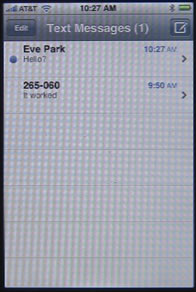
The main SMS Text screen shows your recent conversations. You can use the Edit button to delete conversations. You can also swipe left to right across the listing with your finger and press the Delete button that appears.
To start a new conversation, press the pencil-in-box button at the upper right.
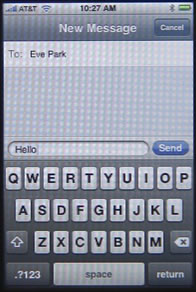
Enter a phone number, or use the + button to select one from your address book. Then click on the small text area next to the Send button to enter your message. Press the Send button to send.
Once a conversation has started, or if you select an old conversation, you will see a list of messages along with some buttons. You can press the Call button at any time to call the person you are conversing with. You can press the Contact Info button to see their listing in your Address Book.
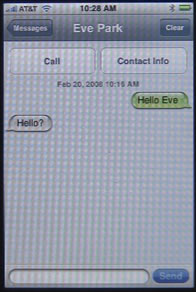
The rest of the screen shows your conversation, with your messages to the right, and the other person’s messages to the left. You can send a new message using the text area and the Send button at the bottom of the screen. You can also use the Clear button to clear out the old messages.


could you please let us know how to forward or save masges in sim card
thanks
kashif: Not sure. I don't think the iPhone uses the sim card the same way that other phones do. I believe that SMS messages are saved on the iPhone's memory. Emails are definitely not on the sim card. Voice mail is probably just on the network.
in my one..! the space z nt wrkng..!
IPhone dropped the ball with their SMS application IMO. There is no feature (Included on most other phones) to delete or purge all SMS messages on the phone. For those of us that use our phones for work and receive many,many SMS messages, this is a requirement.
is there a way to copy and paste in SMS or resend a text without retyping it?
tap it twice and hit copy , then go to the open space and tap it twice then hit paste
yes.. you tap 'edit' at the top of the screan, tap the message you want to forward.. and then at the bottom of the screen should say, 'FORWARD' or 'DELETE' , click 'FORWARD' and then put the recipients you want :)
No, there's no copy and paste in the standard iPhone apps, unfortunately.
Is there any way to save an SMS conversation, or give my SMS more space so I do not have to delete the whole conversation? I've been having an ongoing conversation over the past 3 months, and do not want to delete it.
IrishStew: I haven't tried it yet, but you might want to do a search for "MobileSync Browser" and try that.
Thanks rosenz... it seems to work, but it isn't up to date. I'm guessing I would have to pay for the full version to get my complete SMS box. It only shows me messages up until the end of August. i'm gong to have to do this soon, anything more then 10 messages over the main conversation, and I'm getting SMS almost full messages. WOOHOO!!!! Thanks Again!!!
So I uninstalled Itunes and deleted the "MobileSync Browser”. When I reinstalled Itunes and reran the "MobileSync Browser” it showed me upto date information!!!! THANKS AGAIN ROSENZ!!!!!!
There is no way to save sms messages but there is an alternative if you have a text you'd like to keep for reference or posterity. Make sure the text you want is on the screen, then press and hold the power button on the top of your iPhone and then press the square button at the bottom. This will take a 'screen shot' of the screen and record it as a photo in your camera roll. Not ideal but better than nothing.
Press on the message to invoke the Copy function, select the text you want (the whole message text is selected by default) and press Copy. Go into Notes, create a new note, give it a name and, below that press on the screen to invoke the Paste function. press Paste.
So you have saved all or part of the message as a Note.
Hi Ive owned my first iPhone for 2 weeks and I was so happy when after missing an SMS, it gave me reminder alert. And then another 5 minutes later (the same sound as the original SMS sound). But that was it. Can you change any setting so it continues to remind you of a waiting message until you do touch it and look at it? Its great when youve been somewhere noisy and didnt hear the original message alert. THanks!
Yes in settings you can change it to remind you up to 10 times, settings messages
I have a iphone 3g and want to have messages received continue to alert until read. I have gone to settings and do not see how to extend it to 10 repeats, any help?
Chris to change the number of times you are given alerts for messages, calender, reminders etc.,
Try this :
Settings
Notifications - select for eg: messages
Then in the next screen you will see Notification Center and underneath that tap show. You can then select 1, 5 or 10 times.
Carina: I don't think there is any way to change your SMS settings to play an alert more often. Lets hope Apple will give us some more options in the future.
If you JB your iphone then you can install apps that will allow you to be reminded several times after receiving a text/email/reminder/alert ect. each irrespectivley customisable.... get it done!
can you retreive deleted texts?
As I understand it, no.
Is there a way to delete certain SMS messages and leave the rest from the particular sender. When we send and receive multiple messages to and from any particular recepient, the whole conversation is saved under his/her name or number. How can I remove some particular messages that I do not want and keep the rest as it is? Thank you in advance.
hi, did you find any solution your question if so please let me know how to delete ceratin SMS messages and leave the rest
Hey, if you click into the conversation then press edit on the top right hand corner you can then choose what messages you want to delete. I have 3gs though and it's my understanding you can't do this on the original.
DesI: I don't know since I don't use the native SMS on the iPhone. Maybe someone else can answer?
Hi, I was wondering if anyone knows if there is a way to set up SMS so that the text contained in the recevied SMS is not being shown on the main screen once the SMS is received?
settings > general > passcode lock > show SMS preview off
Is there a way to save a message as a template, so that I can send and resend the same message at different times to different people?
Norm: I'm pretty sure not, as the SMS app is very simple. But some 3rd-party text message apps might have things like this.
Is there an application out there that allows you to type your text messages in the same manner as you can type emails (holding Iphone sideways) to get the wider qwerty keyboard. Those of us with "sausage fingers" find texting pretty tedious, why the difference?
David: I've never seen one, and I'd imagine you'd just need to switch away from the native SMS to another app like Fring to get something like this.
Try pinger Phone. Its in the app store and I love it. Group text and everything. Works in landscape mode as well. I never had any issues and I work with in constantly.
Hi,I'm also wondering about Sarah's question from above:
I was wondering if anyone knows if there is a way to set up SMS so that the text contained in the recevied SMS is not being shown on the main screen once the SMS is received?
I worry a friend will send an inappropriate message and it will display while I'm at work.
Thanks
Dan: You could just switch to using one of the many 3rd-party IM programs. You friends would need to send to a different address, though.
Hi!
I just received my Iphone and I am faced with two problems
a) my phone only vibrates when there is a call --- cannot seem to get the ring tone on
b) although I have the names in my contact list, when these people on my contact list send sms, only their numbers appear and I have a tough time trying to figure out who sent the email. How do I set it that as long as I have their names on the contact list, the sms will reflect the name & not the number
I had to make sure, if they're sending the message through email, that their email address is actually entered in their contact information.
Francine: It may be simply that you have the ring volume turned down, or the silence switch on the side turned on. Not sure about the SMS thing.
How do I change my id in outgoing messages & calls? Right now it states my legal first name and I use my middle name.
chris: not sure if that comes from your contact in the contacts app, or caller ID info registered with AT&T. I know that when I get an incoming message, the display will show the name in my contacts that I have set for that phone number. You're going to have to experiment.
Can you advise on how to forward text's via SMS and also how can you get delivery receipts? Mike
Sometimes my iPhone will make a sound like I have a new text message, but when I go to check it, there is nothing there?? Can anyone explain what this sound means? Thank you.
mcwd: Could it be another alert? Like the sound of email arriving?
No, it sounds like it, but when I check there is no new mail or texts?
I was wondering if you could send picture messages through the original texting app?
BrianD: No. It doesn't have that ability.
I can not set up a customized alert for SMS, I have downloaded ringtone "incoming message" but I can not make it work with messages.
Can anyone help me and tell me how to do it?
How can I use customized alert for text messages? I have custom ringtones but can not set them up as a message alert.
Please help
Silver: No, you can't use ringtones for text message alerts.
Rosenz, thank you for your reply.
I have the same problem as mcwd. Text message alert but no message. Strange.
Rosenz, do you know if I can turn off the sound the phone makes when sending texts? I see how to change it for receiving texts under settings, but not for sending them. Thanks for your help.
I'm not sure.
is there a way to turn off the sound when a text is sent
I'm pretty sure the only way is to lower the volume just before sending.
The SEND button is in a spot where I have accidently sent messages prematurely. Can it be moved to a spot where it is less likely to be hit accidentally. i.e., to the right of the Contact Info box at the top of the screen.
Call Contact Info Send
That way it is unlikely you hit the send button accidentally while creating a message.
Jack
There is no option to rearrange the buttons in apps like that. But you may want to make the suggestion on an official apple forum.
Is it possible to send a text to all in the contacts list
Also Paul 30th dec advised use of pinger phone from apps store can not find it is there anything else
Re: "You can also send text messages from iChat on your Mac. Simply choose Send SMS from the File menu, enter a phone number and a message."
I can't find that feature in iChat. I used to send/receive SMS from from my Mac via my Sony-erricsson, but can't do that with iphone. Anyone know how?
In iChat on the Mac, it is in the File Menu. "Send SMS." -- perhaps you have an old version of iChat? Current is 4.0.8. But I think this feature has been around for a long while.
is there any app or setting without jb my iphone so i wont see either sms text or name pop up???
You can turn of SMS preview in the Settings under Messages. But I don't think you can turn off notification entirely -- defeats the purpose of SMS messages.
Hello! Could you tell me please, how can I view informative messages from my operator and some from other people (I dunno if they send it from phone or any computer program) that appear only once on the screen like a preview for a recieved sms and I can't find them anymore... Thank you very much!!! Olga
Not sure what you mean ... "messages from my operator?" You can get messages via SMS, email, and from a variety of 3rd-party apps that use the "notifications" feature of the iPhone.
Hi Gary, thank you for answering! I mean sms. And it is shown that there's incoming sms but there is nothing inside the smss. Sorry my english is not perfect, it's pretty hard to explain because I don't really understand all those things. Thanx again!
So you are getting blank SMS messages? I'd call AT&T about that.
I get sms with text and I can read it on the screen as a preview, it appears like all sms that I get, but when the screen is off abd I turn it on again it disappears. I can see an incoming sms on the sms-icon, but there is no new sms inside the folder. Normally it happend with informative sms from my operator vodafone, but today it happend with a number which I don't have in the address book and I don't know from whom cause I could't read it and it dissapeared! :(
I’d contact Vodafone about it…
Will this app receive text messages as quickly from my phone #? Can I customize the ringtone of the text message to one that lasts 30 seconds, loud, and obnoxious?
As quickly as what? No, the native SMS app in the iPhone does not allow you to change the ringtone.
Hi I have the same problem...and I was searching now for it I get a new incoming sound of new MSG on my iPhone but when I enter to see the MSG there is nothing .. I knew the problem but I can't find how to view this MSG....the problem is that I deleted the first MSG conversation in my MSG inbox that is related to my friend which we where contacting each other with...anyway a new incoming sound of a MSG came but with no MSG inside .. I knew then that it is my friend who send it.... And I can't view it becaue I deleted the first MSG conversation and on my iPhone to the top right I see a red mark indicating this problem ...anyone could help view this MSG ? Thanks for ur help
The send Burton placement is very unfortunate as it's too easy to hit accidentally. For crucial texts to hot babes I now turn it to flight mode until I'm done writing, to avoid screwing up my game by sending before it's perfect:( horizontal mode is greatly needed too and the ability to scroll up and read earlier texts while typing is inconsistant.
Here is a letter I sent to Apple regarding a story I have about this SMS TEXT Pop up window that cost me my job.
MAJOR SECURITY ISSUE!!!!
Well I just spent 700.00 to apparently UPGRADE from my Blackberry Storm to the Iphone 3GS. I have a macbook pro so it just seemed to make sense.
Anyhow I am thinking I may return the phone and hook up my Telus Blackberry again.
The phone is great, I am very happy with all the features, apps etc etc.
However, there is a HUGE HUGE HUGE SECURITY ISSUE with the fact with the TEXT MESSAGE POP UP.
I am currently applying for other work and had my new IPHONE on the desk.
Although I turned off the SMS Preview it still shows who the text is coming from and the fact you have a text.
My boss was walking by my desk while I was not there and had my phone on the desk and the phone buzzed. He then looked down and saw it was a text message from our main competitor.
Hence loosing my job......
Any correspondence with our company and a competitor is grounds for dismissal seeing as the informations that we know is highly classified.
So I would like to say a big huge THANK YOU!!!! For helping with the loss of my job.
This is incredibly serious and will definitely have a Lawyer looking into this.
I would highly suggest that you do something about this issue before you get some type of class action law suit on your hands.
Again I will be returning the phone for my 700.00 back and then go back to the Blackberry that holds business information very highly highly secure for their users.
Thank you again sincerely for the loss of my job came at such a great time with the economy being so bad and all!!!!
Disappointed,
Troy
Well it is a problem that we all go through and are anticipating the change... however, if it was that serious to you, would you not of had the contact details in your phone under an alias name so that it would not get you in that type of trouble. As a user of this phone, you knew to take off the preview but you left your phone on your desk in clear view with their name showing...
I can only think of one person in this scenario who is to blame...
My text alerts(door bell) on my iphone work fine when I receive a text, but not when I am receiving a reply back. Only the vibrate comes on, not the door bell. Have you heard of this before? Is this something I can change? i keep missing peoples replies...
Ok I've worked out what it does. When you are still in the text conversation screen it difaults to the email received alert, which is a lot quieter. But if you don't get a reply straight away, and it goes out of that screen back to lock or what ever, the text alert (door bell) works.
So I tried to change, or increase the volume of my email alert, and have found out you can't.
Often I will send a text, and put the phone down whilst waiting for a reply, assuming the Text alert I have selected (door bell) will sound.
So I must keep missing them in that time just before the lock kicks in. I return to my phone to see if there has been a reply and nothing has shown up. Having not heard the quiet email alert sound.
I guess this is the difference of having a 'text received' icon sitting on your phone which you have to actually OPEN to see the text, as opposed to the iphone conversation style texting.
Anyway I have worked it out now, I thought I'd post this in case anyone else has had the same gripe.
Perhaps being able to change or increase email alerts could be added, or being given the option to use that alert or just keep using the alert you've selected for receiving texts.
cheers, other than that I love this phone!
alright, it's not the email alert sound, Which I think is just in sinc with your computer email alert settings, so you probably can change that afterall.
I think it's just the text vibrate alert sound. Anyway no door bell whilst in conversation screen.
Can I change that setting?
Cheers
I don't believe so.
Hi Jacki, just been pouring through forums looking for exactly that info - did you ever get the text alert (doorbell) to work in the conversation screen of the message???
Is there any way to back up my SMS conversations. I read above of the app "mobilesyc browser" but I can't locate it in the app store. I've receieved a replacement iphone from my service provider, and need more than just my contacts transfered! Please help
is there a way to automatically send a sms text to my e-mail acct or an app?
From the iPhone? I don't think so.
Hi, is there any way where when I recive a text message it will just say "text message" or somthing similar. I don't want a name to pop up on the notification basically. I've managed to turn off text preview but can't seem to get rid of the name!! Thanks xxx
I'm not sure if that is possible, to be honest. You might want to give your phone company a call and see what they say.
is there any way to edit/modify text messages?
Before you send them? Sure, just backspace or tap and position the cursor to edit as you would with any application on the iPhone.
i am having a prblm in iphone3G.i cant see the names of Sms sender.while its name is in Contact list.anyone can help me plz
I have same problem as Fahad. Has anyone found the solution yet?
Hi, I just unlocked an iPhone that was given to me, and when I insert my company's SIM card it doesn't register all the saved text messages I had on it. How can I retrieve them?
Not sure. I've never tried something like that.
is there a way to edit old text messages from a previous day? specifically to say something else or to add additional texts?
You can't edit them -- once they've been sent they are sent. You can't take them back.
is there an app where it shows the exact time i got the txt, and the time i send mines?...
The SMS app does that. Down to the minute.
my iPhone 3GS keeps telling me that my sim sent a text message. it tells me this pretty much every 5mins and even when I haven't sent a text, I think it is using up all my credit but I don't know how to stop it :/ can somebody please help me? thank you
Call your service provider.
hi , i cannot get my iphone off vibrate dont matter what i do.... is there a headphone/or speaker option somewhere that i cannot find? i have tried taken off vibrate etc etc.. pls can someone help me x this issue? thank u
In Settings, under Sound, there are two "Vibrate" settings. Make sure both are off.
hi gary,
my iphone 3G 8GB is now when messege come is only vibrate. no tone. y? help me....
Have you checked your Settings under sound? Try setting a new ringtone. Also, remember that you can set ringtones for individual contacts. And then make sure your mute button is off. And make sure your volume is up.
Hi about old deleted messages still show up when i go to messagea and on the search are i tried typing a word like " my" or any other word and all my deleted messages popped out on the screen...this is pretty scary...anybody has tried this? And i read that every single messages youve received and sent still stored in iphone no matter how long you have deleted it..
I have a issue so my iPhone 4 is jailbroken and as off two days ago when I receive a text it makes the sound but no pop up or the notification next to the battery I had bite sms but deleted it might that caused the problem
Hi,
Can somebody please share the code that manages to display same UI for To: field here.
Hi, my iphone text message edit stop working for delete/forward message. Do you know what could be wrong? It has this shaded line covering delete/forward option and when I try tuch it does not work. Any help would be appreciated. Thanks!
Hard to tell without seeing it. Take it to the Genius Bar and have them look.
Can any one help me out with this problem that I'm having? I can not delete or forward my SMS messages. A dark line appears over them, keeping me from deleting or forwarding my messages. I press edit and I can see them but my 3G won't let me press them. Please help.
Okay I was hoping someone cld explain: I typed a txt message in my Iphone and hit send, then Immediately turn iphone off after awhile i turn the phone back on and saw "SEND SUCCESSFUL" Has anyone else experienced delayed sent messages?
Are you sure the send was delayed? Maybe the send happened immediately, but you just didn't get the message until you turned on the phone again.
My freind said he got the message the same day i saw Send Successful
My messages that i receive are incomplete! i mean i get all the short ones completely but the long ones just end abruptly as if the remainder of the words got eaten up! it happens only with the long ones, anyone know a solution to this?
Is it possible to add additional text to a previous text conversation.
You should be able to continue a conversation, yes.
i am having the same problem mentioned above, In iphone3G i cant see the names of Sms sender.while its name is in Contact list.anyone can help me plz, URGENLTY
I recently upgraded to iPhone 4S thru Verizon. I've been trying to find the setting to be able to call the person texting me using the text messaging screen. My friend has an iPhone 3 thru AT&T...where there is a "call" & "contact" button under the contact name. I don't have such buttons. Is there a setting I need to change or is this option not available with Verizon??
On the most recent version of the Messages app, you would scroll to the very top of the messages in the list. At the very top are buttons, including the Contact button that would take you right to their contact and you can click on their phone number. There also may be a "call" button if they are using a phone number to text (as opposed to an email address via iMessage).
Why don't the contacts name come up when I receive a text message or a call I have saved my contacts to the phone anyone have any ideas I just brought the new iPhone 4s I'm stuck please help
Not sure. Hard to say without seeing it.
My iPhone 4 resends old texts from hours or days ago on its own and doesnt show it in my conversation window so i am very confused when people will text me and ask why I sent a text message that they received way earlier. It is frustrating. Is there a way to fix this??
Have you tried contacting your carrier? The problem may be with them, not your iPhone.
I am trying to retrieve an SMS chain that's been hidden. I can see the person's name on my SMS inbox but when I go into the name the conversation chain is gone. I think someone ellse hid this particular chain b/c the rests of myy conversations exist in my inbox. How can I unhide this conversation thread for this particullar person? Thanks
I type and send a text to contact A go back to main text screen and select contact B the message from contact A is in the text box in grey where it usually reads "Text Message" the new message is in black and types over the message to contact A but the send button is non responsive. the only way I have been able to get rid of the text to contact A showing up in any new text conversation and to be able to send a text is to reset the phone.
i cant see the sms sender name but i see his number although his number save in contact list have
when i get sms i cannot reply it after reading,to reply i have to again open sms and from there have to go to contact list and reply it.can you help me out
thanks
seems while group texting on the iphone 4, after about 8 or 9 recipients, I lose the plus icon enabling to add additional contacts to the message. Is this normal? Is there a trick to get it back? thanks for any help
mcknz
Hi all. Just got an iphone3GS - when I insert my SIM card in, I cannot seem to access the saved SMS messages on there - help?! I really need to access these messages.
I'm pretty sure that the iPhone doesn't use the SIM card for storage like that. That's something older smartphones did.
I have an iPhone 4 and recently changed my Microsim card from Australian Vodafone to UK 3 when I went to london recently. Will my previous phone messages be saved on to the temporarily used UK Microsim card? I have just taken it out and sent it back to a friend to use in the UK!
Not sure. I didn't think anything was saved to the SIM card on an iPhone. It is just an identifier.
Is there a way to add specific phone nos as VIP's for text messages ( as there is on the iPad) ?
As far as I know, VIPs are a feature of Mail, not Messages on the iPad.
Thanks Gary, - I did manage to get phone nos in my VIP list on iPad - went int po contacts & fiddled from there- but not phone. Mig.