
The iPhone Notes application lets you type, store and email small text documents.
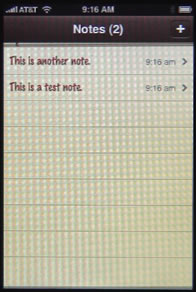
The main screen will list the notes you have stored, and the last time you edited them. Press on a note to edit it. Press the + button to create a new note.
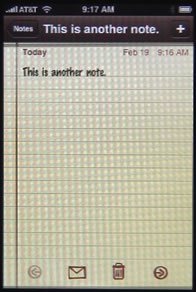
When viewing a note, you have a few buttons at the bottom of the screen. You can use the arrows to move from note to note. You can use the letter-shaped button to email your note. You can use the trash can to delete the note.
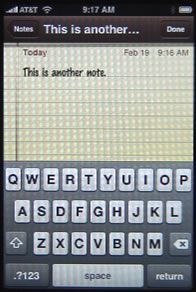
Click on the body of the note to enter edit mode. This will bring up the keyboard. You can type on the keyboard to enter text. You can roll your finger over the text in the note to reposition the cursor. To enter non-letter characters, press the the .?123 button at the bottom left. You can press, hold, roll and release to enter a single special character, or tap on the .?123 button once, and then tap on a key to type multiple characters.
iPhone Notes Application
Comments: 85 Comments
Comments are closed for this post.


Hi
I am loving my iPhone, but I am really disappointed that the Notes feature does not sync. Do you know of any work-arounds? Is there any other app that will work just like Notes on the Mac? I have seen a few like EverNote, but am concerned about storing my notes externally and some products don't sort the list alphabetically. Any suggestions?
BTW, thanks for your Podcasts - I love them.
Cheers
Kelvin
I hear you. It is disappointing that Notes still don't sync. But the solution is 3rd-part apps. I use EverNote. But there are plenty of others that vary by feature. I'd just look through them and find the ones that fit your needs best.
Hi,
Do you know how to sort the Iphone notes in an alphabetical order?
Thanks,
Simcha
No, not on the iPhone anyway. I don't think the app was even meant to be used for so many note that they would need to be sorted. There are lots of 3rd-party notes applications available and I'm sure some of them allow for sorting.
3rd party note apps will not sync with outlook. Any other ideas?
I too am disappointed that notes cannot be put in alphabetical order, especially when mine are synchronized from Notes in Outlook which are in alphabetical order. Does MAC purposefully change the order! As so many people wnat an alphabetical listing, shouldn't MAC do something about it rather than us all buy apps. It can't be rocket science!
Is there any way to increase the size of the typeface in the notes application. It is so tiny!!
No. But there are dozens (hundreds) of 3rd-party apps that allow you to take notes. So you may want to find one that works better for you.
My mistate I deleted a "note" which had important data; is there a way to recover or undelete this note file.
I have iPhone 3GS and have not upgraded to OS 4.x version
The only thing I can think of is to go to your iPhone backup data in iTunes on your Mac (~/Library/Application Support/MobileSync/Backup and open it in some sort of programming tool to try to find the older Notes data. But I don't know your experience level with such things. If it was to work, there would be a lot of steps involved. I'd take the computer with your backup data to a data recovery expert and explain the situation very carefully. But I'd only do that if the data was really critical -- it might get expensive. On the other hand if you are a programmer type, and have some tools to look through the files, you might get lucky.
I did the VERY same thing. NEVER FEAR call Apple products support. Tell them you need an APPLE GENIUS. They will advise you. Breathe it is an easy fix.
I am editing notes on my iphone 3GS and it will not save the changes! Any advice?
Just experiment. Create notes on you Mac and sync and then try editing those. Create a new note on your iPhone. Try things. Maybe switch to Evernote?
Does anyone know how to recover notes that you have put in the trash? Recently when I create a new note a double copy appears. When I deleted the extra copy, both notes get deleted. anyway to recover the deleted notes?
It depends what system you are using. For instance, if the note was created attached to a Gmail account, then it might be in your Gmail trash. But if it was created elsewhere, you might not be able to recover it.
On Apple Notes, I noted that for a reason that I do not know, the whole screen would be blank and seemed to be completely erased but when I pressed the screen to bring up the magnifying glass the notes are under the magniflying glass and therefore seemingly hidden. How do I get entire notes back onto the screen? Pls advise.
Not sure. Sounds like a bug. It is pretty extreme, but restoring your iPhone from a backup may be the next thing to try. Not sure if the problem is big enough to warrant such a measure. If you use notes a lot, you may want to use a third-party program like Evernote anyway, as the Notes app is pretty basic.
Once I have created a note and hit done, I am having trouble bringing the keyboard up to edit the note. It keeps bringing up the magnifying glass if I hold too long, or the select all feature if I tap once, or the copy feature if I tap twice. What do you think I can do to quickly and consistently bring up the keyboard when editing a Note in the iPhone notes App?
Tap once, quickly, to bring up the keyboard again. It sounds like you are holding the tap too long.
Thanks Gary, you were right!
i subscribe to and enjoy all your newsletters and find them very informative and helpful.
i am having an issue with i was hoping you might be able to shed some light on for me.
i use the notes app frequently on my iphone 3GS and lately when i go to make a change or addition to an existing note, the keyboard will not pop up.
i will only get the select/copy/paste menu. it happens sporadically and i tried shutting down the app, restarting the phone and doing a hard reset. nothing seems to
have helped and i was wondering why all of a sudden it was happening and if any other readers might have had the same issue.
i took the iphone software update yesterday hoping this might have been addressed but to no avail.
it started approximately two months ago and seems to be an increasing occurrence.
any suggestions would be greatly appreciated.
lauren
Have you tried it in a new note, or only existing ones? I wonder if the notes may have gotten "locked" in some way. Perhaps starting a new one will work.
I use the notes all the time but I'm not able to return to the main notes page that list all my notes anymore. I can search for a note and edit it. My wife have the exact same iPhone 4 and no issues. Any ideas? Tks.
Not sure. Is the "Notes" button at the top left just missing?
Yes. Just the date and time at the top.
Interesting...I turned off my iPhone and restarted it. It works. I should have done this weeks ago. I usually never turn it off so the problem just never went away. Thanks for the interest.
When I write a note and hit done it immediately emails the note to my email address and deletes the note. Amy suggestions??
Thank you,
Notes can be part of email accounts like MobileMe and Gmail. IMAP accounts, basically. When you create a new note using one of these accounts, then they appear in your "Inbox" as Notes. They aren't really emails at all, just notes. Try creating a note under a different account (look for the Accounts button at the top). I can create "From My Mac" notes that aren't synced to my email account.
The lines and words in all my notes disappeared. When I go to start a new one same thing lines and words start to disappear. I have an iPhone 4. Thanks.
I'm having the same problem now. Did you ever solve yours?
Notes app is great, and it is syncing well with outlook. However, need to sort alphabetically and need to pword protect. Is there an app that can do all of this, while taking all my current notes and still syncing?
I just bought a new iPhone 4. I just realized all my notes are on my old phone. Now that that phone is no longer "active", can I sync this phone to my laptop to save all my notes?
So you didn't upgrade to the new iPhone 4 by restoring from the backup of your old one? If you didn't do that, then it will be hard to get those notes. I would just email them from the Notes app on the old iPhone.
Why are my notes on my iphone4 syncing with my husband's phone? He thought that I had been in his phone and posted the note myself. How can I stop this from happening?
Go through the account/Mail settings on both phones. Most likely you are creating notes under an account (MobileMe, perhaps) and that account is also set to sync with the other iPhone.
Hi Gary
Is there a way I can hylight words in Notes?
Not that I know of. Probably best to use a more sophisticated note-taking app if you need something like that. Plenty of those.
I have the Iphone 4G and in the utilities I have notes from my friend's Iphone. We don't share any computer, any account on Itunes or anything. The only thing is that we work in the same place. We have there wireless internet. I haven't even see her in over a month and I have notes from her from 2 days ago. How is this possible? Thanks!
Impossible to say without being there to analyze it. Something, some account, must be shared or have crossed over at some point.
Maybe because the email account of our work? We both have it in our iphones.
If it is the same account, then yes. Notes are an element of email accounts, usually.
Ok! Thanks a lot for your help!!!!
I love Notes. Having just bought an iPad I have discovered notes automatically update to my iPhone. This is great meaning any notes I make or lists are already on my phone when I take it out in the morning without the hassle of syncing to a main computer. Wish there was a calendar that did this!
Calendars do this too. But it is important to distinguish between calendars that only update when you sync and calendars that update through "the cloud." A cloud-based calendar will update over the network, without syncing. Examples are Google calendars and iCloud calendars.
My Notes sent important information to the trash can on its own! I had been using the Notes app a lot and had about 20 pages on my iPhone 4. I was adding a new page and all of my other pages went to the trash can at once. I've searched, but I cannot find a way to bring them back. I had all of my passwords, safe combinations, propietary info. etc. in the Notes app. I really need this stuff. It will take me days to reconstruct this data. Please help.
Perhaps you are simply not subscribed to that account anymore? What type of account was it?
It's the Notes app that came with the iPhone. I'm a newbie to iStuff. I don't understand what "subscribed to that account" means.
Notes usually come attached to an email account. I don't know if that is the case with you. But, for instance, a Gmail account can include messages, notes, events, etc. So check in your Mail settings to see what accounts you have and make sure notes are turned on.
I have the old iPhone 3 (I think that's what it's called) and I had 1200 (twelve hundred) notes and I found this was too many for the phone to handle. I noticed I could only scroll down a very short way before it slipped out of notes and returned to the home screen. Soon after, I guess I had added a few more notes, I could not reenter notes at all, it would open a blank note and then slip out altogether. I tried turning it on and off but no remedy.I was thrown into panic for a bit but thought to iPhone search under a word I might have had in notes, and this found a particular note and opened it. I was then able to go forward and backward. I deleted about 200 notes yet wasn't able to reenter notes from the home screen. A few days later however I could.
I heard that Apple Cloud might be able to transfer notes, but I also heard this contradicted. So I am now patiently manually transferring 1200 notes!
You should really look into using a more sophisticated Notes app if you are going to be using it that heavily. Try Evernote.
Thanks, I'll check it out.
I opened my Notes app and found that all my information was gone - it said No Notes! Don't know when this happened since I don't use it that often, but what I had been collecting over the last few years is gone. Have you heard of this problem? If so, is there a way to find the data? I stopped by the Apple store and they suggested that the Notes app would have sent me emails regularly, but I can not seem to find that information anywhere in my email inbox. Thanks.
Just recently, text from some of my Notes has disappeared either when I reopen them to add to them or once, while I was entering info. I know the text is there because I can email it, but cannot see or edit it on my iPod. Even using the magnifying glass, I cannot see it (as someone who posted a question earlier on your page could.) Do you know why it might be happening to some notes and not others and do you have any suggestions for resolving it? Thanks!!
Hard to say what might be happening. But keep in mind that Notes are either part of your email account (iCloud, MobileMe, Gmail) or things synced to your Mac ("on my Mac"). So figure out what these notes are and then track them down that way. Perhaps they are with one of your email accounts and you've got an email settings to archive new messages and it is doing that to your notes.
I keep losing recently added "notes" on my iphone4 when I sync my phone with itunes (on my iMac). It keeps reverting back to my notes from 3 months ago. I don't even know where these notes are on my computer, nor do I know where to change the setting to allow the changes I make on my phone take precedence.
Any help would be greatly appreciated...Thanks!
the notes in my iphone4 automatically synced in the mail app of my mbp lion os. i accidentally deleted the notes in the mail app and was shocked to find out that it was also deleted in my phone. is there a way i can retrieve it?
So if you are using iCloud, then the notes are in iCloud -- the server. You are only viewing them on your iPhone or Mac. So deleting them will simply delete them and you can't see them in either place again. No way I know of to get those back.
Is there a way to search within the notes list? ie: can i type in "gr" and it will automatically find my groceries list? Otherwise i have to scroll thru a non-alphabetical list of 100+ notes which is ridiculously tedious.
No, not really. If you have that many notes (more than a dozen) you should probably switch to a more powerful app. Try Evernote.
I accidentally deleted my Notes from my iPhone home screen. Is there any way to get it back? When I double press the Home button it appears there and I can open it from there, but I would like it back on Home screen.
Oops, never mind, after searching more diligently I found it misplaced in a home screen folder. I must have fat fingered it there!
I have an iphone version 4.3.3 (8J2) that i am about to upgrade and have just done a sync - am I correct in assuming that after the upgrade I will be able to reload all my apps and most importantly my 'notes' app and all the notes that I have loaded into it over the last few months once I're-sync' the phone to resore all the apps and data?
Yes, basically. But notes are usually stored with your email account (iCloud, gmail, etc). So there are lots of different ways you can have it configured. If you have important notes, email them to yourself as a backup just to be sure.
In switching to iCloud most of my iPhone notes disappeared. Is there any way to retrieve them?
Depends on a lot of factors. What were your notes? Were they notes associated with an email account? If so what kind? Or, were they notes just one your iPhone, not associated with an account. Then when you switched to iCloud you deleted the notes (it warned you in that case).
You are a very patient person, Gary Rosenzweig, to keep providing many of the same answers to very similar questions. By reading this collection of questions/answers related to notes, and more specifically to retrieving a list note, I learned a great deal. My solution? Unbeknownst to me, I accidentally copied and cut the entire note which was a daily log for my doctor. After recreating the log, it occurred to me that I may have done this ( since it wasn't in other suggested spots), and sure enough the entire "note" or log pasted itself back. Hallelujah! You might consider a summary "solution" to retrieving "lost" notes that shows up first, including your repeated recommendation to use a more sophisticated app (which I plan to do). Thanks for the assistance!
Can someone send a note to me and it appear in my note app? Never heard of this, just wondering if it was possible to send something to another person's note application
Well, a note is like an email that is not sent to anyone -- it just stays as a small document in your email account. So a note sent to you by someone would just be a regular email.
I have a 4S and every so often notes simply double themselves. Like an idiot I erased all the doubles and then found the original had also been erased.
Why are they doubling? I noticed in 2010 someone complained about the same thing so that was probably on an iPhone 3.
My guess is that you are subscribed to the same account twice. Look to see which accounts you have in your Mail settings. See which include notes. Are any the SAME account, like two iCloud accounts, or one iCloud and one MobileMe (same account).
Thanks. I think you're right. I had added another account to enable automatic bcc to my main email address and the notes were turned on by default.
Thanks all for the information on retrieving a lost Note. I accidentally deleted mine and wanted to provide a little more info as a novice. I went into Settings and then selected Notes and could see that my default account was GMail. I then went to Mail and then to Accounts (folders below Inbox folders). I then went to GMail and selected the All Mail folder. Edits to my Notes were there looking like separate emails! It's almost as if everytime I edited a note (not sure how long it goes back but I had 500 edits) it put an email in the All Mail folder. Hope this helps someone else too!
If you're looking for an easy note taking app, you can try Magic Note.
Is there a way to stop automatic formatting in Notes? I have a note that includes rows with various numbers. On a few of the rows, they automatically format as a phone number link. Can this format be removed?
Thank you!!
I'm not seeing that. If I type a 10-digit number, it remains as I typed it. Maybe play around with how you are entering numbers?
Do old notes eventually disappear from the app as I continue to add new notes?
No. Old notes should never disappear unless you delete them.
Hmmm... I think you may be on to something.... It might be that the notes on my iPad are not syncing correctly with my iPhone. What do you think?
Hard to say. There are many ways to set it up. Usually through a cloud service: iCloud, Gmail, Exchange, etc. Set it up for iCloud on both devices for the simplest way.
I removed my hotmail account from my iPhone and all notes disappeared, over 80 ov them. When I added hotmail back, the notes came back. I have never seen notes in my online hotmail account and don't understand how they can possibly be related.
Notes are a part of an email account. They can be part of an iCloud, Exchange, Gmail account, etc.
I don't want the date & time to change if I simply view and make a slight change to an old note. Is there a way to remove the date & time and only "stamp" if I want or at the original date of entry? I know there are other note apps but I have another issue currently - 1 iCloud acct, 2 SEPERATE apple accounts. I am backing up today, updating to my new apple account but I wanted this corrected beforehand.
Sorry, I don't think there is a way to modify this behavior. Why is it that you don't want the date to change? Perhaps the way you are using Notes is actually something better suited for a better type of app -- like a to-do list manager, etc.
Like many others, I want a simple app to record various kinds of information and allow me to retrieve it by alphabetical sorting. I've tried many apps and they all have complicated offerings but pretty usually a date driven aproach. Does anyone know of a very simple app that can hold information, access it title and avoids endless complications?
So you want to create notes with titles and sort them alphabetically? Why not use Evernote for that? Seems to fit the bill.