
The iPhone’s Clock application has a lot going on that you might not expect. There are actually four different functions built in: World Clock, Alarm, Stopwatch and Timer.
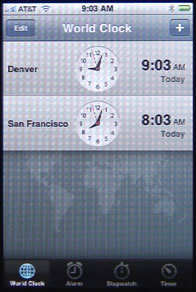
The World Clock allows you to add several different locations using a search, and it will show them all in a vertical list. Use the + button to search for and add a location. Use the Edit button to delete locations and change their order.
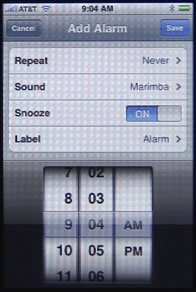
The Alarm allows you to add one or more alarm times to a list. You can specify the sound to play, whether to allow a snooze function, and you can name the alarm. You can also have the alarm repeat on one or more days of the week. You set the time for an alarm using three dials at the bottom of the screen. So, for instance, you could set the alarm to wake you Monday through Thursday at 7 a.m., and then Friday at 7:30 a.m. and Saturday at 10 a.m. You could also set an alarm for every day at 10 p.m. to remind you to take medication or let the cat out.
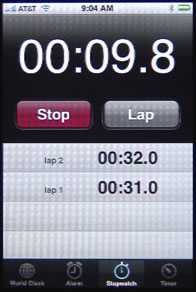
The Stopwatch is the simplest feature of the clock. It simply has a Start and Reset button. When you press the Start button, it changes to a Stop button. Meanwhile, the time changes and displays in tenths of a second. The Reset button changes to a Lap button. Press the Lap button and the time is recorded in the list and the stopwatch resets to 0 and continues counting.
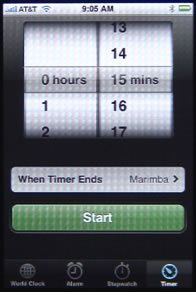
The Timer function shows a dial at the top of the screen that allows you to set a time in hours and minutes. Then you can press the Start button to start counting down. You can also specify a sound to play when time is up.
iPhone Clock
This is useful for things like remembering when parking meters expire. Say if you feed 2 hours worth of time into a meter. Just set a Timer for 2 hours, or maybe 1:50, and you’ll get a reminder when you need to feed the meter.
Comments: 3 Comments
Comments are closed for this post.


is this clock app available for the iPad?
No. But there are plenty of better apps available from 3rd parties. Search the App Store.
Agreed the timer is a really great tool in the clock app. But,it can be done better.
Take a look at the Elapsed App (http://www.elapsedapp.com) which lets you track multiple timers concurrently, save frequently used timers as presets for easy reuse and triggers alerts even while the App is not running. You’ll find it a significant upgrade from the default timer that ships with the iPhone.