
The iPhone calculator is a simple calculator with minimal functions.
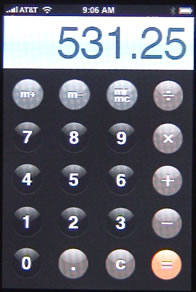
To do a simple calculation, enter in a number, then an operation, then another number, and then the = button. For instance, to add 13+86 you would enter 1 then 3, then +, then 8 and 6, then =.
To calculate a restaurant tip, you would enter the total bill, then X for multiplication, then . and 2 to find 20% of the bill. Then press = to get the result.
There is also a memory function. Press m+ to store the current number in memory. Once it is there, you can use m+ to add to that number. Use m- to subtract from memory. When you want to get the result that is in memory, use mr/mc. Press it again to clear memory. When a number is stored in memory, the mr/mc button is outlined.
The c button will clear the current operation.
The calculator will perform operations in standard mathematical order. So 3+4×2 will return 11. This is because multiplication and division are performed before addition and subtraction. To do the equivalent of 3+4 multiplied by 2, you would type 3+4=x2=.
Note that dividing by 0 does not return an error in the iPhone calculator. It returns 0.
Pressing the = button will repeat the last operation. So 3+4×2 will return 11. Press = again and you get 22, then 44, then 88, and so on.


If you turn the phone on it's side while in Calculator - viola! A full scientific calculator appears - it's not so basic after all...
Enjoy!
When I turn my phone to the scientific calculator, on the screen it says "Deg". What does that mean, can I clear it off the screen.
There are two modes for scientific calculations pertaining to angles: Deg (degrees) and Rad (radians). Tap the Deg/Rad button (bottom left corner) to switch between modes. There's no way to clear it from the screen -- it is always there so you know which mode you are in.
Greg: Yes, you're right. That was added after this blog post was originally published. Thanks!
what software version is this? My calc is the same whether its turned on its side or not
barb: I'm using 2.1. Can't remember whether it is in 2.0 or not. I know it isn't in 1.X.
How to use the M+, M-, MR, MC buttons?
Example 2x3+3x3+4x3+5x3=?
They work the same as they do on any calculator. M+ adds to the number in memory, M- subtracts from it, MR recalls memory and MC clears it.
So you could do MC to clear. Then 2 x 3 = M+ to put 6 into memory. Then 3 x 3 = M+ to add 9 to it for 15. Then 5 x 3 = M+ to add another 15 to memory. Pressing MR would then give you 30.
Why, oh why, isn't there a clear error button on calculator. Or is there a simple way to do this?
Just press the clear (C) button. That clears everything.
How do you invert sine or tan of an angle
2nd sin-1 or tan-1 is the answer it seems
Yes, but with CE you just clear the last number entered. How am I supposed to enter data with no way to correct without loosing it all?
swipe your finger across the calculator screen and it will remove the last digit typed, and you can repeat the action to delete more digits and fix your error.
is there a fancy way to calculate the Mean on iphone calc?
Well, it works like any other calculator. So add a list of numbers together and divide by the number of numbers.
If you want something more sophisticated, like a spreadsheet, try the Numbers app.
can you please tell me how you erras (just ) a number
that you typed in error on your calculator. In other words, not voiding the previous numbers ?